
Long drives are easier when essential information stays in your line of sight. The best car head-up displays for road trips can show speed, navigation guidance, vehicle data, and alerts without requiring frequent glances down at the dashboard.
This roundup compares 10 options ranging from simple GPS speedometers to larger displays with OBD2 connectivity, wireless CarPlay, and Android Auto. Use the buying guide below to match the display type, installation method, and features to your vehicle and travel habits.
Best 10 Car Head Up Displays for Road Trips Picks for 2026
Best GPS Precision

- 10Hz dual-mode GPS + BDS positioning
- Large MPH display with auto brightness
- USB plug-and-play; no OBD port required
Best For: Road trippers wanting a simple, readable GPS speed display
Best Minimalist Design
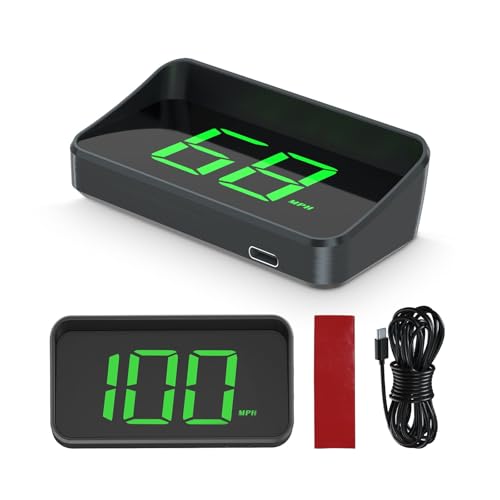
- Speed-only display keeps the view uncluttered
- Large projected font for quick glances
- Type-C plug-and-play setup with included accessories
Best For: Drivers seeking a simple GPS speed HUD
Best Large-Readout Value
- 10Hz GPS + BDS speed tracking
- Large anti-reflective MPH readout
- USB-powered for broad vehicle compatibility
Best For: Drivers wanting a readable, no-OBD speed display
Best Connected Display

- Wireless CarPlay and Android Auto support
- Color screen for speed, navigation, calls, and alerts
- Adaptive brightness with anti-glare display
Best For: Road trippers wanting navigation and hands-free connectivity
Simple GPS Essential
M1 White Windshield Projection HUD

- Shows GPS speed and travel direction
- Adds overspeed and fatigue alerts
- Automatic brightness with USB setup
Best For: Drivers wanting a minimal, easy-to-install road-trip HUD
Connected Travel Upgrade
VIVIHUD V3-SE Wireless CarPlay HUD

- Wireless CarPlay and Android Auto
- HD anti-reflection display
- Bluetooth audio and hands-free calling
Best For: Older vehicles needing a portable connected infotainment screen
High-Refresh Speed Monitor

- Dual GPS+BDS positioning with 10 Hz refresh
- Large anti-reflective speed display
- Speed calibration and overspeed alert
Best For: Drivers wanting responsive, readable GPS speed data
Best GPS Display

- 5.5-inch screen with 10+ display combinations
- GPS speed, mileage, direction, and trip data
- USB plug-and-play setup with rotating bracket
Best For: Road trippers wanting customizable GPS information and quick installation
Best Vehicle Data Monitor

- Large HD display with automatic brightness
- Shows speed, RPM, temperature, voltage, and fuel use
- OBD2 diagnostics plus speeding and voltage alerts
Best For: OBD2-equipped vehicles needing broader trip and engine information
Best Universal Connectivity

- GPS-based compatibility across many vehicle types
- CarPlay and Android Auto support
- Includes OBD and cigarette-lighter power options
Best For: Drivers wanting smartphone integration and flexible vehicle compatibility
Best GPS Precision – High-Refresh-Rate Car HUD
For drivers comparing car head up displays for road trips, this USB-powered GPS HUD emphasizes fast speed updates, visibility, and broad vehicle compatibility. Its large MPH readout projects speed into your line of sight, while automatic brightness adjustment is designed for changing conditions.
Best For: Road trippers who want a simple, large-font GPS speed display without using an OBD port.
Pros:
- Dual-mode GPS + BDS positioning with a 10Hz refresh rate and support for up to 32 satellites.
- Large, anti-reflective MPH display with automatic brightness adjustment.
- USB 5V plug-and-play power works with most vehicles equipped with a USB port.
Cons:
- GPS accuracy can vary by about 0.6–1.8 MPH.
- Signal may be affected in tunnels, underground garages, heavy rain or fog, and vehicles with metallic windshield film.
This is a practical choice when speed visibility matters more than extra navigation or entertainment features. Its straightforward USB setup also makes it easy to move between compatible vehicles.
Best Minimalist Design – Compact M2 Windshield HUD
If you prefer a distraction-free approach to car head up displays for road trips, the M2 focuses on one essential driving detail: speed. Its compact GPS display projects large white characters onto the windshield and uses automatic brightness adjustment for daytime and nighttime driving.
Best For: Drivers who want a minimal speed-only HUD with Type-C plug-and-play installation.
Pros:
- Simple display presents speed without adding extra information to the driver’s view.
- Large projected font is designed for quick glance readability.
- Includes a Type-C USB cable, reflective film, 3M sticker, and English manual.
Cons:
- The unit displays speed only, with no listed navigation or media features.
- Speed appears only after the device acquires a satellite signal.
The M2 is suited to buyers who value simplicity over a feature-rich dashboard. Installation is uncomplicated, but satellite acquisition should be considered before relying on it at the start of a trip.
Best Large-Readout Value – USB GPS Car HUD
This GPS speedometer is a straightforward option for shoppers looking at car head up displays for road trips. It combines a large MPH projection, automatic brightness control, and USB power, making it suitable for vehicles that lack a compatible OBD connection but have an available USB port.
Best For: Drivers who want an easy-to-read, USB-powered speed display for cars, trucks, or motorcycles.
Pros:
- Dual-mode GPS + BDS technology and a 10Hz refresh rate support responsive speed tracking.
- Large font and anti-reflective metal shading aid visibility, including for drivers wearing sunglasses.
- Automatic brightness adjustment helps adapt the display from daytime to nighttime conditions.
Cons:
- GPS readings may deviate by approximately 0.6–1.8 MPH.
- Satellite reception can be interrupted by tunnels, garages, weather, or metallic windshield film.
This model keeps the focus on readable speed information and broad USB compatibility. It is a sensible fit for long-distance driving when you do not need built-in calls, music, or turn-by-turn navigation.
Best Connected Display – Wireless CarPlay HUD
For drivers who want more than speed information from car head up displays for road trips, this 2.99-inch color dashboard HUD adds wireless CarPlay and Android Auto. It combines navigation, calls, media streaming, and vehicle data options on an anti-glare screen with adaptive brightness.
Best For: Road trippers seeking a connected dashboard display for navigation, hands-free calls, and media.
Pros:
- Supports wireless CarPlay and Android Auto with Bluetooth connectivity.
- Displays speed, GPS alerts, calls, and navigation on an 800×268 color screen.
- High-luminance anti-glare display, adaptive brightness, and a non-slip silicone base suit varied road conditions.
Cons:
- Its broader feature set is more involved than a basic speed-only GPS HUD.
- OBD vehicle data is optional, so available information can depend on the setup.
- It uses up to 5W of power and is dashboard-mounted rather than a windshield projection-only unit.
This is the strongest match for travelers who want a compact connected co-pilot rather than only a speedometer. The color display and smartphone integration add useful road-trip functionality while keeping key alerts in one place.
Simple GPS Essential – M1 White Windshield Projection HUD
For drivers who want straightforward car head up displays for road trips, the M1 focuses on the essentials: GPS-based speed, travel direction, and alerts. Its compact, plug-and-play design projects a simple readout onto the windshield without adding a crowded interface.
Best For: Road trippers who want a basic speed display with minimal visual distraction.
Pros:
- Displays speed, compass direction, and selectable MPH or KM/H units.
- Includes overspeed and fatigue-driving alerts.
- Automatic brightness adjustment adapts for daytime and nighttime use.
- USB installation is simple and includes a reflective film and anti-slip mat.
Cons:
- GPS speed appears only after the unit acquires satellites.
- Satellite reception can be slower near buildings, in garages, under overpasses, or with metallic windshield film.
- Its display is intentionally limited to basic information rather than navigation directions.
The M1 is a sensible choice when simplicity matters more than connected features. Allow extra time for satellite acquisition before setting off, especially if your vehicle has a metallic windshield coating.
Connected Travel Upgrade – VIVIHUD V3-SE Wireless CarPlay HUD
The VIVIHUD V3-SE is a more feature-rich option among car head up displays for road trips. It combines wireless Apple CarPlay and Android Auto with an HD screen, Bluetooth audio, hands-free calling, and phone screen mirroring in a portable unit that does not require replacing the vehicle’s factory display.
Best For: Drivers of older cars, SUVs, pickups, vans, or RVs who want modern smartphone connectivity.
Pros:
- Supports wireless Apple CarPlay and Android Auto for maps, music, calls, messages, and voice assistants.
- HD anti-reflection display is designed for visibility in daylight, tunnels, rain, and at night.
- Offers Bluetooth audio, hands-free calling, and smartphone screen mirroring.
- Adjustable viewing angle and non-slip mounting base help keep the screen positioned.
Cons:
- Requires a compatible iPhone or Android phone to use its connected features.
- It is a dashboard-mounted screen rather than a simple windshield projection display.
- The supplied notes do not specify built-in navigation independent of the connected phone.
Choose the V3-SE if your road trips involve navigation, music, and calls and your vehicle lacks factory CarPlay or Android Auto. Its broader feature set is useful, though it demands more setup and attention than a speed-only HUD.
High-Refresh Speed Monitor – K4 GPS Car HUD
The K4 is aimed at drivers who want a readable GPS speed display for long journeys. Its dual-mode GPS+BDS positioning, 10 Hz refresh rate, adjustable brightness, and large anti-reflective readout make it a practical candidate among car head up displays for road trips.
Best For: Drivers who prioritize large, frequently refreshed speed information and adjustable calibration.
Pros:
- Uses GPS+BDS signals and a 10 Hz refresh rate for responsive speed data.
- Supports MPH/KM/H switching and manual speed calibration.
- Offers multiple brightness levels for daytime and nighttime viewing.
- Includes a customizable overspeed alert and large anti-reflective display.
Cons:
- GPS reception may be affected in tunnels, underground garages, heavy rain or fog, and by metallic windshield film.
- It is powered through USB and does not include connected navigation or smartphone features in the supplied notes.
- The default display is speed-focused rather than a full projected navigation interface.
The K4 makes the most sense for road trips where quick speed checks are the priority. Its calibration option is useful for matching the vehicle’s dashboard, while the signal limitations are worth considering if your route includes tunnels or coated windshields.
Best GPS Display – Multifunctional G12 Car HUD
For drivers comparing car head up displays for road trips, the G12 offers a large, easy-to-read screen with GPS-based driving information and a straightforward USB setup. Its multiple display layouts let you prioritize the data you find most useful.
Best For: Road trippers who want GPS speed, trip information, and flexible placement without a complex installation.
Pros:
- 5.5-inch borderless screen with more than ten display combinations.
- Shows speed, time, trip mileage, driving direction, coordinates, and other travel data.
- USB plug-and-play installation takes about five seconds and includes a 360-degree rotating bracket.
- Includes speed alerts, fatigue-driving reminders, and a one-year warranty.
Cons:
- Uses a plastic construction.
- The feature-rich interface may require time to configure to your preferred layout.
The G12 is a practical choice when quick setup and broad trip-data visibility matter most. Its GPS and Beidou dual-mode positioning support and adjustable mounting options make it well suited to long drives.
Best Vehicle Data Monitor – A8 5.5-Inch OBD2 HUD
Among car head up displays for road trips, this A8 model stands out for combining a large windshield-facing display with OBD2 vehicle monitoring. It can show speed alongside engine and electrical information, helping drivers keep an eye on the vehicle during extended journeys.
Best For: Drivers with an OBD2/EOBD vehicle who want speed, engine data, and diagnostic features in one display.
Pros:
- 5.5-inch HD screen with automatic brightness adjustment for day and night driving.
- Displays GPS speed, RPM, water temperature, voltage, and fuel consumption.
- Provides overspeed and voltage alerts.
- Plug-and-play OBD2 connection and support for failure detection, alarms, and code clearing.
Cons:
- Compatibility is centered on vehicles using OBD2 or EOBD protocols.
- Vehicle data availability may vary by car.
This is the strongest fit for road-trip drivers who want more than a speed readout. Confirm that your vehicle uses a compatible OBD2/EOBD protocol before buying, then use the display as both a travel gauge and basic diagnostic aid.
Best Universal Connectivity – HUD-V3 CarPlay HUD
For road trips across different vehicles, the HUD-V3 combines GPS speed display with CarPlay and Android Auto support. It offers two power options and uses GPS rather than model-specific OBD wiring, making it a flexible option for newer, older, modified, and non-OBD-compatible vehicles.
Best For: Drivers seeking broad vehicle compatibility, smartphone integration, and a compact dashboard-mounted display.
Pros:
- Works with sedans, trucks, SUVs, RVs, pickup trucks, modified vehicles, and some cars without OBD support.
- Supports CarPlay and Android Auto with Bluetooth and Wi-Fi connection instructions.
- Includes both OBD and cigarette-lighter power cables.
- Designed for direct sunlight, temperatures from -20°C to 75°C, and automatic overheat protection.
Cons:
- Phone pairing requires Bluetooth and Wi-Fi to be enabled.
- The unit has active cooling and may automatically cut power if it exceeds its stated temperature range.
- Its larger listed package dimensions may require careful dashboard placement.
The HUD-V3 is a versatile choice when vehicle compatibility and smartphone connectivity are higher priorities than a simple speedometer. Its dual power setup and GPS-based operation are especially useful for road-trip vehicles with unusual or unavailable OBD connections.
How We Picked the Best Car Head Up Displays for Road Trips
We focused on the features that matter most during extended highway driving: readable projection or screen design, speed accuracy, navigation support, installation simplicity, alert visibility, and compatibility with different vehicles. The selection includes GPS-based units that work independently of a vehicle’s diagnostic port, OBD2 models that can provide additional car data, and smart displays with wireless CarPlay or Android Auto.
We also considered practical details such as screen size, font clarity, USB power requirements, windshield visibility, and whether the unit is suitable for both older and newer vehicles. Since road-trip conditions vary, no single display is ideal for every driver.
Quick Comparison
| Display Type | Best For | Typical Strength | Potential Limitation |
|---|---|---|---|
| GPS speedometer HUD | Older or mixed vehicle fleets | Simple installation and broad compatibility | Usually offers less vehicle data |
| OBD2 HUD | Drivers wanting engine and trip information | Can access vehicle-specific data | Compatibility may vary by vehicle |
| CarPlay/Android Auto HUD | Navigation and media integration | Smartphone-connected directions and calls | Requires phone pairing and app support |
| Large-screen display | Drivers prioritizing readability | Easy-to-see numbers and icons | May take up more dashboard space |
Key Buying Factors for Car Head-Up Displays for Road Trips
Visibility and Screen Layout
Choose a display with large, high-contrast characters that remain readable in bright daylight. A dimming function or adjustable brightness is useful at night. Make sure the projected image or screen can be positioned without blocking the road.
GPS, OBD2, or Both
GPS-based models are generally the easiest choice for broad compatibility and can provide speed and direction without vehicle-specific wiring. OBD2 units may offer extra readings, but check whether your car supports the required data connection. Some models combine both approaches for greater flexibility.
Navigation and Smartphone Features
If you want turn-by-turn directions, hands-free calling, or media controls, consider wireless CarPlay or Android Auto support. Confirm that your phone and operating system are compatible before buying, and remember that these displays typically depend on the phone’s navigation app.
Installation and Power
Most units use USB power or a vehicle accessory socket. Look for plug-and-play setup, a stable mounting method, and cables long enough to route neatly. A secure installation is especially important on rough roads.
Who Should Buy Which Car Head Up Displays for Road Trips?
Choose a compact GPS HUD if you want a straightforward speed and direction display for multiple vehicles or an older car. An OBD2 model is better for drivers who value additional vehicle readings and have a compatible port. Select a larger-screen HUD if visibility is your top priority, particularly for drivers who find small dashboard numbers difficult to read.
For connected navigation, calls, and media, a wireless CarPlay or Android Auto model is the strongest fit. If you share a vehicle, frequently switch cars, or want the least complicated setup, prioritize universal compatibility and GPS operation. Whichever style you choose, position it carefully, test brightness in both daylight and darkness, and keep your primary attention on the road.