
Older cars can gain modern driving information without a full dashboard replacement. A head-up display can project speed, navigation data, engine readings, and alerts where you can see them with less eye movement.
We selected 10 options that cover simple GPS speedometers, OBD2 diagnostic displays, dual-system units, and models with smartphone connectivity. The right choice depends on your car’s compatibility, the information you want to monitor, and how cleanly you want the unit installed.
Best 10 Car Head Up Displays for Older Cars Picks for 2026
Best OBD2/GPS Value
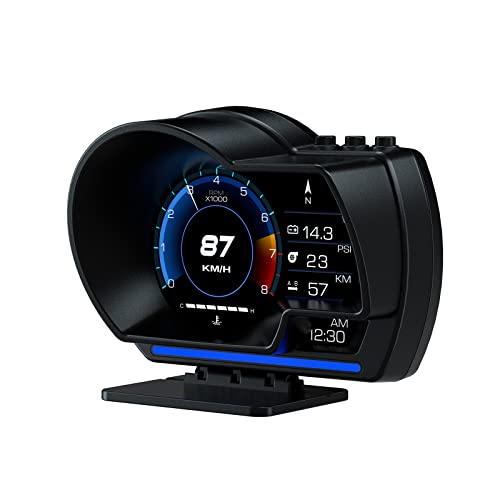
- OBD2 and GPS dual-mode operation
- Displays speed and multiple vehicle readings
- Adjustable dashboard or windshield mounting
Best For: Drivers seeking flexible vehicle data and GPS backup
Best Universal Fit

- GPS operation for older and non-OBD vehicles
- Supports CarPlay and Android Auto
- Includes two power options and overheat protection
Best For: Older, modified, or non-OBD-compatible vehicles
Best Diagnostic Features

- Real-time monitoring with extensive vehicle data
- Scans and clears engine fault codes
- Customizable alerts and GPS fallback mode
Best For: Compatible OBDII/EOBD owners wanting diagnostic functions
Best OBD2/GPS Value – P6 Smart Gauge HUD
For drivers comparing car head up displays for older cars, the P6 is a flexible option when you want both vehicle data and GPS backup. It can show speed, voltage, fuel consumption, RPM, water temperature, and other readings while projecting information at a glance.
Best For: Drivers who want a multifunction display with OBD2 and GPS modes, adjustable mounting, and built-in vehicle-data features.
Pros:
- Uses OBD2 and GPS modes, with GPS available if the vehicle lacks compatible OBD2 support.
- Displays a broad range of information, including speed, voltage, fuel consumption, RPM, and water temperature.
- Offers dashboard or windshield installation with an adjustable bracket and non-destructive mounting options.
- Automatic brightness adjustment and a red overspeed warning help keep information visible.
Cons:
- OBD2-related readings depend on vehicle compatibility and protocol support.
- The unit is more feature-focused than a simple speed-only display.
The P6 stands out for older-car shoppers who want diagnostic-style data as well as speed information. Its dual-mode design adds flexibility, although buyers should verify their vehicle’s OBD2 compatibility before relying on its full feature set.
Best Universal Fit – HUD-V3 CarPlay HUD
Among car head up displays for older cars, the HUD-V3 is designed for broad compatibility because its GPS positioning does not depend on model-specific OBD wiring. It also adds CarPlay and Android Auto support, making it a practical plug-and-play choice for many vehicles.
Best For: Owners of older, modified, or non-OBD-compatible vehicles who want GPS speed, smartphone integration, and simple installation.
Pros:
- GPS-based operation is intended to work with older vehicles and cars without OBD connectivity.
- Supports CarPlay and Android Auto, with Bluetooth and Wi-Fi connection guidance included.
- Offers both OBD-line and cigarette-lighter power options.
- Designed for temperatures from -20°C to 75°C, with overheat protection and automatic cooling-fan operation.
Cons:
- Smartphone integration requires Bluetooth and Wi-Fi setup.
- GPS operation does not provide the same vehicle-data depth as an OBD2 diagnostic display.
The HUD-V3 is especially appealing when compatibility is the main concern. Its GPS foundation avoids many OBD limitations, while smartphone features make it more useful for drivers who want navigation and media functions in an older car.
Best Large Display – A8 5.5-Inch HUD
The A8 is a straightforward pick for drivers looking for car head up displays for older cars with a large, readable screen. Its 5.5-inch HD display presents speed and other vehicle information, while its plug-and-play design keeps installation simple for compatible vehicles.
Best For: Owners of OBDII or EOBD vehicles who prioritize a large screen and access to basic driving and diagnostic information.
Pros:
- Large 5.5-inch HD display is designed for clearer information viewing.
- Shows speed, water temperature, voltage, driving distance, and alarm prompts.
- Can read vehicle data and support failure detection, alarm, and fault-code clearing.
- Supports kilometer-per-hour and mile-per-hour display switching.
Cons:
- Only supports OBDII and EOBD systems; it does not support OBD I or JOBD.
- Its broad vehicle compatibility depends on the car having the required diagnostic protocol.
The A8 makes sense if a larger display is more important than GPS flexibility. Before buying, confirm that the older vehicle uses OBDII or EOBD, since unsupported systems will prevent the device from delivering its intended data features.
Best Diagnostic Features – MH OBD2+GPS HUD
For shoppers evaluating car head up displays for older cars, the MH HUD combines a speed display with a useful set of diagnostic and performance readings. It can monitor data such as RPM, water temperature, voltage, fuel consumption, altitude, and turbo pressure, while also offering GPS mode when needed.
Best For: OBDII/EOBD vehicle owners who want customizable alerts, real-time data monitoring, and basic fault-code functions in one display.
Pros:
- Displays extensive real-time information, including speed, RPM, fuel consumption, temperature, voltage, and altitude.
- Can scan and clear engine fault codes and read real-time data streams.
- Offers adjustable brightness, multiple interfaces, unit selection, and customizable speed, temperature, voltage, and RPM alarms.
- Provides GPS mode with speed, satellite time, altitude, direction, mileage, and driving-time readings.
Cons:
- OBD2 mode is limited to compatible OBDII/EOBD vehicles produced after 2008.
- Listed incompatibilities include diesel, hybrid, pickup, RV, modified-computer vehicles, and several specific brands.
- GPS mode may be the only available function on an incompatible vehicle.
The MH HUD is a strong choice for buyers who want more than a projected speed reading. Its diagnostic tools and adjustable alerts are useful, but the extensive compatibility exclusions make checking the vehicle list an essential step before purchase.
Easy-Read GPS Pick – Large-Font K1 HUD
For drivers comparing car head up displays for older cars, the K1 is a straightforward USB-powered option that avoids an OBD connection. Its large MPH readout, automatic brightness adjustment, and GPS-based speed tracking are practical features for improving glanceability.
Best For: Older drivers and vehicles with a USB port that need a simple, readable speed display.
Pros:
- Large font and anti-reflective shading help improve readability, including when wearing sunglasses.
- USB 5V plug-and-play power works without an OBD port.
- Dual GPS+BDS positioning, 10Hz refresh, and connection to up to 32 satellites support responsive speed tracking.
- Automatic brightness adjustment is designed for both daytime and nighttime use.
Cons:
- GPS speed can vary by approximately 0.6–1.8 MPH.
- Signal may be affected in tunnels, underground garages, heavy rain or fog, and vehicles with metallic windshield film.
- It requires a clear GPS signal and a USB port.
The K1 keeps the feature set focused on readable GPS speed information. It is a sensible fit for older cars when easy installation and a large display matter more than vehicle-data features.
Feature-Rich Dashboard Option – G12 Multifunction HUD
The G12 is a versatile choice among car head up displays for older cars, combining USB plug-and-play installation with a broad selection of driving information. Its 5.5-inch borderless screen can show speed, time, mileage, direction, coordinates, alerts, and other data combinations.
Best For: Drivers who want a larger screen and more information than a basic GPS speedometer provides.
Pros:
- Displays more than ten interface combinations for customizable information layouts.
- Shows speed, time, mileage, driving direction, latitude, longitude, acceleration timing, and alerts.
- USB installation is described as plug-and-play and takes about five seconds.
- Includes a 360-degree rotating bracket for flexible placement on the console or elsewhere.
Cons:
- The larger 5.5-inch unit may occupy more dashboard space than compact HUDs.
- Its many display options may require more setup than a single-purpose speed display.
- GPS-based information depends on satellite reception.
With its larger display, adjustable interfaces, and rotating mount, the G12 suits drivers who want a multifunction dashboard companion. Its one-year warranty adds some support coverage for installation or use questions.
Compact USB Alternative – K1 GPS HUD
For older cars with a USB outlet but no convenient OBD connection, this K1 GPS HUD offers a compact way to monitor speed. It uses dual GPS+BDS positioning, a 10Hz refresh rate, automatic brightness, and a large MPH display designed for quick reading.
Best For: Drivers seeking a lightweight, low-installation HUD for a USB-equipped older vehicle.
Pros:
- Requires only 5V USB power and works with most cars, trucks, and motorcycles that have a USB port.
- Large MPH digits and anti-reflective metal shading support quick viewing.
- Automatic brightness adjustment helps adapt the display between day and night.
- Lightweight 1.6-ounce design takes up little space.
Cons:
- It displays GPS-based speed rather than vehicle data from an OBD port.
- Speed may deviate by approximately 0.6–1.8 MPH.
- GPS reception can be temporarily disrupted by tunnels, garages, weather, or metallic windshield film.
This version is best viewed as a compact, uncomplicated speed display rather than a full vehicle-information system. It makes sense when a USB connection and readable MPH information are the main priorities.
Best All-Rounder – Universal GPS HUD Speedometer
If you’re comparing car head up displays for older cars, this universal GPS model is a straightforward option for vehicles without relying on an OBD2 connection. It displays speed, supports MPH and KM/H, and installs through your car’s lighter port.
Best For: Drivers who want simple GPS speed tracking, safety alerts, and broad compatibility with 12V vehicles.
Pros:
- GPS-based speedometer works with many 12V gas, hybrid, and electric vehicles.
- 3000-lumen display with automatic adjustment is designed for daytime and nighttime visibility.
- Includes overspeed and fatigue-driving alerts, plus six display modes.
- Plug-and-play lighter-port installation requires no mechanic.
Cons:
- Not compatible with 24V-or-higher heavy trucks.
- Uses a dashboard-mounted display rather than a true windshield projection.
Its GPS operation and simple setup make it a practical upgrade for older cars, especially when you want speed information without installing a vehicle-specific diagnostic display.
Best for Older Drivers – High-Refresh GPS Car HUD
Among car head up displays for older cars, this compact GPS HUD emphasizes readable speed information and straightforward USB installation. Its large-font display, adjustable brightness, and calibration feature can make it easier to match the readout to your driving preferences.
Best For: Older drivers who prioritize a large, easy-to-read speed display and customizable warning settings.
Pros:
- Dual GPS+BDS reception and a 10 Hz refresh rate support responsive speed readings.
- Large MPH display with anti-reflective metal shading is designed for easy viewing.
- Supports MPH/KM/H switching, manual speed calibration, and multiple brightness levels.
- USB plug-and-play power simplifies installation.
Cons:
- GPS reception may be affected in tunnels, underground garages, heavy rain, fog, or behind metallic windshield film.
- Its speed data depends on satellite reception rather than direct vehicle diagnostics.
This is a focused choice for drivers who mainly need a clear GPS speedometer, with useful customization options and an overspeed alarm but fewer vehicle-status features than an OBD2 gauge.
Best Multifunction Display – 5.5-Inch OBD2 HUD
For older cars equipped with a compatible OBD2 or EOBD port, this model combines a large 5.5-inch display with vehicle-monitoring data. It goes beyond speed by showing information such as RPM, water temperature, voltage, and fuel consumption.
Best For: Owners of compatible vehicles who want both a readable speed display and extra engine-status information.
Pros:
- Large 5.5-inch HD screen with automatic brightness adjustment.
- Displays GPS speed, RPM, water temperature, voltage, and fuel consumption.
- OBD2 diagnostic functions include failure detection, alarms, and failure-code clearing.
- Plug-and-play setup works with many vehicles using OBD2 and EOBD protocols, widely used after 2003.
Cons:
- Requires a compatible OBD2/EOBD vehicle, so it may not suit all older cars.
- Offers more information and installation considerations than a basic GPS-only display.
This is the most feature-rich option of the three, but compatibility should be confirmed first. If the vehicle supports it, the added gauges and diagnostic features can make it a useful maintenance-oriented upgrade.
How We Picked the Best Car Head Up Displays for Older Cars
We focused on features that matter most when upgrading an older vehicle: broad compatibility, readable projection, reliable speed data, straightforward installation, and useful warning functions. The selection includes GPS-based units that work independently of the car’s diagnostics port, OBD2 models that can show vehicle data, and dual-system displays that offer both connection methods.
We also considered screen size, MPH/KMH support, overspeed alerts, engine information, and whether a display supports CarPlay or Android Auto. Because older cars vary widely in model year and available ports, buyers should confirm compatibility before ordering.
Quick Comparison
- Simple speed and navigation: GPS displays are usually the easiest option and can work in vehicles without compatible OBD2 support.
- Vehicle information: OBD2 models may show RPM, coolant temperature, voltage, mileage, and diagnostic warnings, depending on the car.
- Maximum flexibility: OBD2+GPS units provide a backup speed source and more installation choices.
- Phone-connected features: CarPlay and Android Auto models suit drivers who want navigation, calls, and media information in one interface.
- Best visibility: Large-screen models are useful if small projected numbers are difficult to read.
Key Buying Factors for Car Head-Up Displays for Older Cars
Connection and Compatibility
Check whether the display uses GPS, OBD2, USB power, or a combination. GPS units are generally the safest fit for older cars, while OBD2 models require a compatible diagnostic port and may provide different data depending on the vehicle.
Information Shown
Decide whether you only need speed or also want navigation, RPM, voltage, water temperature, mileage, fault alerts, and fatigue or overspeed warnings. More information is useful only if the screen remains easy to read.
Visibility and Installation
Look for adjustable brightness, a clear projection surface, readable numerals, and a placement that does not obstruct your view. A reflective film may improve visibility in bright conditions. USB-powered units are often simpler to move between vehicles.
Units and Alerts
Confirm MPH or KM/H support before buying. Adjustable speed alarms are preferable because fixed thresholds may not suit your local limits or driving habits.
Who Should Buy Which Car Head Up Displays for Older Cars?
Choose a GPS model if you drive an older vehicle, want the simplest setup, or are unsure whether its OBD2 system is supported. Choose an OBD2 display if engine readings and diagnostic information matter as much as speed. Choose a dual-system model if you want broader compatibility and a backup source for speed data.
Choose a CarPlay or Android Auto display if you want phone-based navigation and media features without replacing the factory stereo. Choose a large-screen unit if readability is your priority or you prefer a more prominent dashboard display. Before purchase, verify the included cable, power requirements, mounting method, display units, and return policy.