
A heads-up display can make navigation easier to glance at, but not every model puts directions in the same place. Some project onto the windshield, while others use a dashboard-mounted screen—and phone compatibility varies.
These seven options span compact displays, wireless CarPlay and Android Auto models, and HUDs with speed or vehicle-data features. Here’s what to check before choosing one for your car.
Best 7 Heads Up Displays with Navigation Picks for 2026
Best for Older Vehicles
VIVIHUD V3-SE Wireless CarPlay HUD

- Wireless CarPlay and Android Auto
- Anti-reflection HD display
- Adjustable, non-slip dashboard mount
Best For: Adding phone-based navigation to older vehicles
Best Compact Speed Readout

- 10Hz GPS speed updates
- Compact dashboard footprint
- Sunshade and large LED digits
Best For: A simple USB-powered speed display
Best Small Navigation Screen
PLEXYNOVAR 2.99-Inch CarPlay HUD

- Wireless CarPlay and Android Auto
- 2.99-inch anti-glare color screen
- Adaptive brightness and voice controls
Best For: Phone navigation on a compact dashboard display
Best Auto-Dimming Speed HUD
GPS/BDS Windshield Speedometer
- 10Hz GPS/BDS speed updates
- Automatic brightness adjustment
- 5V USB power; no OBD connection
Best For: A speed-only display that adjusts to changing light
Wireless Phone Integration
HUD-V3 CarPlay and Android Auto Display

- Wireless CarPlay and Android Auto
- Voice control via Siri or Google Assistant
- Adjustable display with non-slip base
Best For: Phone-based navigation without replacing the factory radio
Best for Everyday Use

- GPS/BDS speed tracking at 10Hz
- USB power; no OBD connection
- Auto brightness adjustment
Best For: A compact speed display, not route guidance
Windshield Projection

- Windshield-oriented HUD design
- Displays iPhone apps via CarPlay
- Automatic brightness adjustment
Best For: iPhone users seeking windshield-oriented CarPlay
Best for Older Vehicles – VIVIHUD V3-SE Wireless CarPlay HUD
If you’re comparing heads up displays with navigation for a vehicle without built-in CarPlay, the VIVIHUD V3-SE adds wireless Apple CarPlay and Android Auto in a portable dashboard display. It provides access to compatible phone navigation apps without replacing your original screen.
Best For: Drivers who want phone-based navigation and media in an older car, SUV, pickup, van, or RV.
Pros:
- Wireless CarPlay and Android Auto support maps, calls, messages, and media.
- HD anti-reflection display adjusts brightness automatically.
- Plug-and-play setup, adjustable viewing angle, and non-slip base.
Cons:
- Navigation features require a compatible connected smartphone.
- The supplied notes do not specify the screen size.
This is the most feature-focused option here for adding familiar phone apps to a vehicle that lacks them. Check that its dashboard placement works for your driving position.
Best Compact Speed Readout – 10Hz GPS Dashboard HUD
Not all products listed among heads up displays with navigation provide route guidance. This compact GPS unit is a speedometer: its dual-mode positioning chips and 10Hz refresh rate are intended to keep a current speed reading in easy view.
Best For: Drivers who want a small, USB-powered speed display rather than turn-by-turn directions.
Pros:
- GPS speed updates up to 10 times per second.
- Large LED digits and a sunshade hood help with daytime readability.
- Approximately 3.46 inches wide and 0.47 inch thick for a compact dashboard fit.
Cons:
- No maps or turn-by-turn navigation are specified.
- Needs a compatible USB power source.
Choose this one for a straightforward speed reference that takes up little dashboard space. If you need actual navigation prompts, look for a model with stated phone-map support.
Best Small Navigation Screen – PLEXYNOVAR 2.99-Inch CarPlay HUD
Among heads up displays with navigation, this 2.99-inch PLEXYNOVAR model is a compact choice for wireless CarPlay and Android Auto guidance. Its 800 × 268 color screen also presents speed, calls, and GPS alerts, according to the supplied product details.
Best For: Drivers who want smartphone navigation and calling on a small dashboard-mounted screen.
Pros:
- Wireless CarPlay and Android Auto support hands-free guidance, calls, and media.
- Anti-glare screen offers three brightness levels plus adaptive adjustment.
- Non-slip silicone base and voice controls support everyday use.
Cons:
- The 2.99-inch screen may feel small if you prefer a larger map view.
- OBD/GPS data is described as optional; verify what is included.
Its appeal is the combination of phone connectivity and a compact color display. Confirm the available data connections before buying if vehicle diagnostics matter to you.
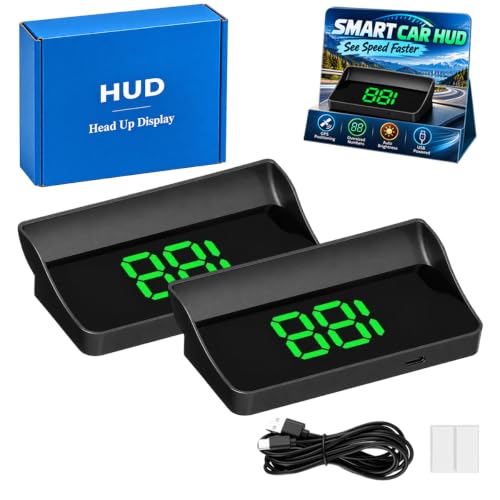
Best Auto-Dimming Speed HUD – GPS/BDS Windshield Speedometer
If you’re shopping heads up displays with navigation, note that this model uses GPS and BDS for positioning, not stated route directions. It focuses on large MPH digits, 10Hz speed updates, and automatic brightness adjustment.
Best For: Drivers who want an easy-to-read speed display with automatic day-to-night brightness changes.
Pros:
- GPS/BDS dual-mode positioning supports responsive 10Hz speed updates.
- Light sensor adjusts brightness as conditions change.
- Runs from a 5V USB source without using the vehicle’s OBD port.
Cons:
- No turn-by-turn navigation or map display is specified.
- GPS readings can vary or lose signal in tunnels, garages, severe weather, or behind metallic windshield film.
This is a practical speed-first pick, especially if you prefer USB power over an OBD connection. Treat its speed as a supplemental reference rather than assuming uninterrupted satellite reception.
Wireless Phone Integration – HUD-V3 CarPlay and Android Auto Display
For shoppers comparing heads up displays with navigation, the HUD-V3 brings wireless Apple CarPlay and Android Auto to a dashboard-mounted display. It can show phone-based maps alongside calls, media, and driving information without replacing the factory radio.
Best For: Drivers who want wireless phone navigation and voice controls in a plug-and-play dashboard unit.
Pros:
- Supports wireless CarPlay and Android Auto for maps and compatible phone functions.
- Works with Siri and Google Assistant for voice control.
- Anti-glare display, adjustable viewing angle, and non-slip silicone base.
Cons:
- Navigation relies on a connected smartphone.
- Requires dashboard space for its 10.23-by-6.3-inch body.
Choose this model if phone integration matters more than a minimal speed readout. Its broad feature set is useful, but check that the unit will fit your dashboard and preferred sightline.
Best for Everyday Use – EQUELY GPS HUD Speedometer
Not every product listed among heads up displays with navigation actually provides directions. This compact EQUELY unit is a GPS/BDS speedometer: it shows current speed with a 10Hz refresh rate, but its supplied features do not include maps or turn-by-turn guidance.
Best For: Drivers seeking a small, USB-powered speed display rather than navigation.
Pros:
- GPS/BDS speed tracking works without an OBD connection.
- USB plug-and-play setup uses a compatible 5V power source.
- Automatic brightness adjustment and an anti-reflective shade aid visibility.
Cons:
- Does not list map or turn-by-turn navigation.
- Requires a compatible 5V USB power source.
This is the straightforward pick when a quick speed check is the priority. If you need route guidance in your forward view, look instead at a model with stated navigation features.
Windshield Projection – CarPlay Navigation HUD
Among heads up displays with navigation, this model emphasizes a windshield-facing projection and iPhone CarPlay app display. Its automatic brightness sensor adjusts the image for daytime and nighttime driving.
Best For: iPhone users who want a windshield-oriented CarPlay display with automatic brightness.
Pros:
- Designed as a head-up display for car windshields.
- Supports displaying iPhone applications through CarPlay.
- Light sensor adjusts brightness automatically.
Cons:
- Android Auto support is not listed.
- GPS reception may be affected in tunnels, heavy rain or fog, and vehicles with metallic windshield film.
Consider it if windshield placement and iPhone integration suit your setup. Before buying, account for the stated GPS reception limitations and confirm that its listed CarPlay support matches your phone.
How We Picked the Best Heads Up Displays with Navigation
We focused on the seven selected products’ advertised navigation capabilities, display formats, phone connectivity, and extra driving information. We also considered practical questions a buyer should verify: where the image appears, how the unit gets power and position data, and whether it will fit the dashboard. Product names and feature claims alone cannot establish real-world brightness, projection quality, app support, or vehicle compatibility, so confirm those details on the current listing before ordering.
Quick Comparison: Heads-Up Displays with Navigation
The main split is windshield projection versus a separate screen. The Smart in-Car HUD Co-Pilot listings emphasize a windshield view and GPS speed information. The Universal 2.99-inch model offers a compact screen with advertised wireless CarPlay and Android Auto. The VIVIHUD V3-SE and Upgraded HUD list phone integration alongside vehicle-data or diagnostic features. The integrated CarPlay navigation model emphasizes a high-definition projection display. Several Co-Pilot listings have very similar names; check photos, specifications, seller, and included accessories rather than assuming they are identical—or meaningfully different.
Key Buying Factors for Heads-Up Displays with Navigation
Where Directions Actually Appear
“HUD” can describe a windshield projection, a reflected image, or a small standalone display. Check product photos or documentation for the exact viewing surface. If you want directions near your line of sight, also consider whether the mounting position obstructs your view of the road. If you prefer an easier-to-position screen, a dashboard display may be the better fit.
Navigation and Phone Compatibility
Look for explicit support for your phone and preferred navigation app, not just the word “navigation.” Wireless CarPlay and Android Auto can provide a familiar phone-based interface when supported, but advertised support does not guarantee that every app feature or instruction will appear on the display. Verify pairing requirements and whether navigation depends on your phone’s connection and location services.
Power, Speed Data, and Visibility
Before buying, identify the power connection and plan a cable route. Models advertising OBD2 or diagnostic data may need access to the vehicle’s OBD2 port; GPS-based speed models may use different data. Check vehicle-compatibility notes for any OBD2 features. For either display style, look for brightness adjustment and consider glare, nighttime dimming, dashboard shape, and windshield reflections.
Who Should Buy Which Heads Up Displays with Navigation?
Choose a wireless CarPlay or Android Auto option if phone-based maps are your priority, and compare its stated screen or projection format before deciding. Consider a windshield-focused Co-Pilot model if keeping prompts closer to your forward view matters most. If you also want speed, alerts, or diagnostics, start with models that explicitly advertise those features—but verify which information can be shown at the same time as navigation. For a small cabin or crowded dashboard, check the 2.99-inch option’s dimensions; for any car, measure the available space and confirm the return policy before purchase.