
The best car GPS devices with digital displays make essential driving information easier to see without forcing you to look down at a phone. This roundup includes full navigation units, compact head-up displays, GPS speedometers, and combination devices with extra safety features.
We compare screen visibility, navigation capability, installation, alert functions, and overall practicality so you can choose a device that fits your vehicle, driving habits, and budget.
Best 10 Car Gps Devices with Digital Displays Picks for 2026
Best Safety-Focused HUD
SinoTrack 5.5-Inch GPS Speedometer

- Large screen shows speed and trip data
- Overspeed and fatigue alerts
- Auto-adjusting display brightness
Best For: Drivers wanting a dedicated speed-and-safety display
Best Mid-Size Navigation Display

- Six-inch high-resolution screen
- Voice assist and Bluetooth calling
- Wi-Fi map and software updates
Best For: Daily navigation and North American road trips
Best Plug-and-Play HUD
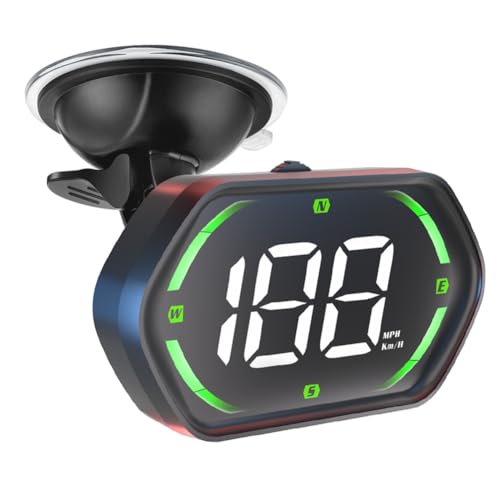
- USB plug-and-play installation
- MPH/KMH display with auto brightness
- Overspeed and fatigue alerts
Best For: Multiple vehicle types needing simple speed display
Best Large-Screen Navigator

- Eight-inch dual-orientation display
- North America maps and road-trip tools
- Voice assist and Wi-Fi updates
Best For: Drivers wanting maximum navigation visibility
Best Compact Speed Display
Shkalacar GPS Digital Speedometer

- Large LED speed display
- GPS and BeiDou positioning
- USB plug-and-play installation
Best For: Drivers wanting a lightweight digital speed display
Best Full-Featured Navigator
Garmin DriveSmart 86 GPS Navigator

- Bright 8-inch touchscreen
- North America maps and updates
- Voice and connected travel features
Best For: Road trippers wanting comprehensive navigation
Best High-Refresh HUD

- 10Hz GPS and BDS refresh
- Automatic brightness adjustment
- USB power without OBD
Best For: Drivers wanting responsive projected speed information
Solar Safety Companion
Wireless Solar GPS HUD Speedometer

- Displays speed, time, temperature, and altitude
- Supports solar and USB charging
- Offers overspeed and fatigue-driving reminders
Best For: Drivers wanting a multifunction solar-assisted HUD
Precision Plug-In Pick

- Combines GPS and Beidou positioning
- Offers four display modes and automatic brightness
- Includes three overspeed alarm settings
Best For: Drivers wanting a configurable USB-powered HUD
Connected Road Recorder
GPS HUD with Dash Camera and Trip Replay
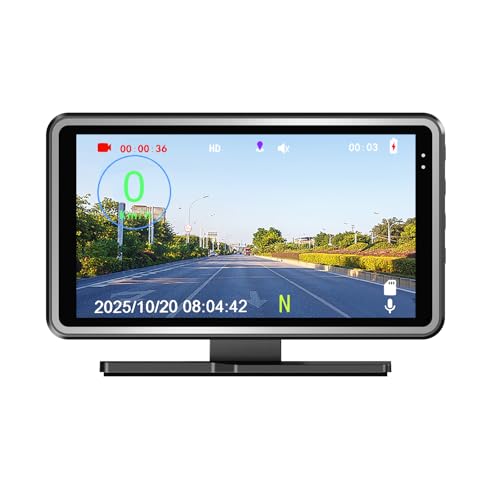
- Combines GPS speed display and dash camera
- Replays routes with map tracking
- Includes a 16GB TF card and car adaptor
Best For: Drivers wanting speed display plus video and route recording
Best Safety-Focused HUD – SinoTrack 5.5-Inch GPS Speedometer
For drivers comparing car gps devices with digital displays, the SinoTrack is a focused heads-up display built around real-time speed and trip information. Its large 5.5-inch screen shows speed, driving time, mileage, time, direction, and satellite information, while automatic brightness adjustment helps keep the data visible in changing light.
Best For: Drivers who want a dedicated GPS speedometer with overspeed and fatigue reminders.
Pros:
- Large display presents multiple driving metrics at once.
- Overspeed and four-hour fatigue alerts add useful safety reminders.
- Automatic light sensing adjusts screen brightness for daytime and nighttime use.
- One-button controls make display settings and information changes straightforward.
Cons:
- It displays current trip mileage but cannot retain or accumulate mileage when powered off.
- Requires a 5V power supply; a higher voltage must not be used.
- Provides driving data rather than full turn-by-turn navigation.
The SinoTrack is a practical choice if your priority is readable speed information and driving alerts rather than map guidance. Its broad data display is useful for everyday driving, provided the power limitations and trip-mileage behavior fit your needs.
Best Mid-Size Navigation Display – Garmin DriveSmart 66
The Garmin DriveSmart 66 is a strong option among car gps devices with digital displays for drivers who want full-screen navigation in a manageable six-inch format. It combines high-resolution North American maps with voice assistance, smartphone-connected traffic features, and trip-planning points of interest.
Best For: Drivers seeking a feature-rich six-inch navigator for daily trips and road travel.
Pros:
- Six-inch high-resolution display includes North America map updates.
- Voice assist and Bluetooth hands-free calling support less distracting operation.
- Includes driver alerts for school zones, sharp curves, and speed changes.
- Wi-Fi enables map and software updates without a computer.
Cons:
- Live traffic, fuel prices, parking, weather, and smart notifications require a compatible smartphone and Garmin Drive app.
- Alexa Built-in also requires pairing with the app and should only be used when safe.
- Its navigation coverage is specified for North America.
DriveSmart 66 balances screen size and functionality well for drivers who want dedicated navigation without moving to a larger display. Its connected features are most useful when you are comfortable pairing it with a smartphone.
Best Plug-and-Play HUD – Universal GPS Speedometer G22
This universal G22 HUD is a simple pick among car gps devices with digital displays when you mainly need speed information without wiring or vehicle modifications. It connects through USB, supports MPH and KMH, starts automatically with the vehicle, and adds adjustable brightness, directional data, and audible safety alerts.
Best For: Cars, trucks, motorcycles, taxis, and golf carts needing quick-install GPS speed information.
Pros:
- USB plug-and-play design requires no wiring or compatibility setup.
- Supports MPH and KMH with large LED-style numerals.
- Automatic brightness adjustment helps readability in different lighting.
- Includes overspeed and four-hour fatigue alerts plus a compass function.
Cons:
- Satellite performance may be interrupted in tunnels, underground parking, or poor weather.
- Best results require an open environment with stronger GPS reception.
- It is a speedometer HUD, not a full navigation system with maps.
The G22 stands out for effortless installation and broad vehicle compatibility. It is a sensible choice for adding a visible digital speed readout, but drivers needing route guidance should consider a dedicated navigator instead.
Best Large-Screen Navigator – Garmin DriveSmart 86
For shoppers prioritizing visibility in car gps devices with digital displays, the Garmin DriveSmart 86 offers an expansive eight-inch high-resolution, dual-orientation screen. It adds voice assistance, North America map updates, driver alerts, and smartphone-connected travel information for longer drives and road trips.
Best For: Drivers who prefer a large navigation screen with extensive road-trip and connected features.
Pros:
- Large eight-inch display supports portrait or landscape orientation.
- Includes North America map updates and extensive points of interest.
- Voice assist, hands-free calling, and driver alerts support convenient driving.
- Wi-Fi allows map and software updates without connecting to a computer.
Cons:
- Live traffic, parking, weather, fuel prices, and smart notifications require a compatible smartphone and Garmin Drive app.
- Alexa Built-in requires app pairing and should be used only when safe.
- The larger display may be less suitable for drivers wanting a compact dashboard device.
The DriveSmart 86 is the best fit here when screen size is a priority. Its dual-orientation display and broad trip features make it especially appealing for road travel, while smartphone pairing unlocks its connected services.
Best Compact Speed Display – Shkalacar GPS Digital Speedometer
For drivers who want car GPS devices with digital displays without adding a full navigation system, this compact Shkalacar HUD provides a clear real-time speed readout. Its GPS and BeiDou positioning, large LED font, and USB plug-and-play setup make it a straightforward fit for cars, trucks, SUVs, buses, and motorcycles.
Best For: Drivers seeking a lightweight, easy-to-install digital speed display.
Pros:
- Large LED font is designed for quick viewing.
- GPS and BeiDou positioning support stable, quick speed refreshes.
- Shading plate helps visibility in daytime and nighttime conditions.
- USB plug-and-play power supports automatic startup and shutdown with the vehicle.
Cons:
- Displays driving speed rather than providing turn-by-turn navigation.
- USB power is required.
At just 45 grams, this is a practical choice when minimal size and non-destructive installation matter more than navigation features. It is best viewed as a dedicated speedometer-style HUD.
Best Full-Featured Navigator – Garmin DriveSmart 86 GPS Navigator
Garmin DriveSmart 86 8-inch Bright Crip Glass Screen Car GPS Navigator (010-02471-00) (Renewed)
Check Price On AmazonThe Garmin DriveSmart 86 is a stronger match for shoppers seeking car GPS devices with digital displays and full navigation functionality. Its bright 8-inch glass touchscreen shows North America maps, while voice assistance, live connected services, and road-trip tools add convenience for longer drives.
Best For: Road trippers who want a large-screen GPS navigator with connected features.
Pros:
- Large 8-inch, 1280 x 800 display supports dual orientation.
- Includes North America map updates and Garmin Real Directions.
- Voice assist, hands-free calling, and smart notifications are available when paired with a compatible smartphone.
- Road-trip tools include Tripadvisor, national parks information, traffic, weather, parking, and driver alerts.
Cons:
- Live traffic, weather, fuel prices, and notifications require a compatible smartphone and Garmin Drive app.
- As a renewed product, condition may vary from a new unit.
- The 8-inch display requires more dashboard space than a compact HUD.
This renewed Garmin is the most comprehensive option here for route guidance and travel planning. Choose it when a large touchscreen and connected navigation matter more than a simple speed-only display.
Best High-Refresh HUD – K1 GPS Speedometer HUD
This K1 model is a practical pick among car GPS devices with digital displays for drivers who prefer speed information projected near their line of sight. Dual-mode GPS and BDS positioning, a 10Hz refresh rate, automatic brightness, and USB power provide a simple, readable setup for compatible vehicles.
Best For: Drivers who want a fast-refreshing windshield HUD with automatic brightness control.
Pros:
- 10Hz refresh rate and support for up to 32 satellites are designed for responsive speed tracking.
- Large speed display projects information toward the driver’s line of sight.
- Automatic brightness adjustment helps accommodate day and night driving.
- USB-powered design does not require an OBD port and suits many cars, trucks, and motorcycles.
Cons:
- GPS speed can vary by about 0.6–1.8 MPH.
- Satellite reception may be affected in tunnels, underground garages, heavy rain, fog, or behind metallic windshield film.
- It displays speed rather than offering turn-by-turn navigation.
With its high refresh rate and auto-brightness feature, the K1 is well suited to drivers prioritizing readable, near-eye-level speed information. Its performance depends on receiving a clear satellite signal.
Solar Safety Companion – Wireless Solar GPS HUD Speedometer
If you want car GPS devices with digital displays that provide more than speed, this solar-powered head-up display adds time, temperature, altitude, and speed information in a large LCD format. GPS positioning, adjustable speed compensation, and dual power options make it a practical choice for drivers who want at-a-glance vehicle data.
Best For: Drivers seeking a solar-assisted HUD with extra trip and vehicle-status information.
Pros:
- Displays speed, time, temperature, altitude, and other vehicle information.
- Supports solar charging and USB power through its built-in battery.
- Large LCD digits are designed for easier viewing in day or night conditions.
- Includes overspeed and fatigue-driving reminders.
Cons:
- Its feature set may be more than needed for drivers who only want speed.
- Solar charging performance can depend on available light.
This is a versatile option for buyers who value a broad information display and reduced dependence on a constant power connection. Its ABS construction and 164 g weight also make it a relatively compact dashboard accessory.
Precision Plug-In Pick – GPS and Beidou Car HUD
Among car GPS devices with digital displays, this plug-and-play HUD stands out for its GPS and Beidou dual-mode positioning. It shows speed, time, direction, and distance while automatically adjusting brightness, making it suited to drivers who want a configurable display without a complex installation.
Best For: Drivers who want a USB-powered HUD with multiple display layouts and adjustable alerts.
Pros:
- Uses GPS and Beidou signals for positioning and supports speed calibration.
- Offers four display modes, including speed, compass, and time views.
- Automatic brightness adjustment helps adapt the display for day and night.
- Provides three configurable overspeed alarm levels and MPH/KM/H switching.
Cons:
- Requires a compatible 5V USB power connection.
- Its many settings may take some initial adjustment.
The W3-HUD is a strong fit for buyers prioritizing flexible configuration and straightforward installation. Automatic shutoff after the vehicle is turned off is also useful for long-term parking, while the included reflective film and anti-slip mat support setup.
Connected Road Recorder – GPS HUD with Dash Camera and Trip Replay
This 3-in-1 model expands on typical car GPS devices with digital displays by combining a GPS speedometer, dash camera, and map-based trip replay. It automatically records while powered on, displays driving data, and includes a 16GB TF card, making it a practical multifunction option for 12V vehicles.
Best For: Drivers who want speed display, driving-video recording, and route replay in one device.
Pros:
- Combines real-time digital speed display with automatic DVR recording.
- Supports replay of driving video with speed and movement history on a map.
- Displays date, time, compass, longitude, latitude, and overspeed alerts.
- Includes a TF card, car adaptor, USB cable, and user manual.
Cons:
- The added camera and tracking functions may be unnecessary for basic speed display needs.
- Its 4.8 x 2 x 3.15-inch enclosure takes more dashboard space than a simple display.
Choose this G100 when recording and trip review matter as much as speed visibility. It supports MPH or KM/H, works with universal 12V vehicles, and offers broad language support, though buyers seeking a minimal HUD may prefer a simpler unit.
How We Picked These Car Gps Devices with Digital Displays
We focused on devices that present GPS-based information in a readable digital format, whether through a windshield-projected HUD, dashboard screen, or dedicated navigation display. The selection includes established navigation models from Garmin as well as universal speedometers and head-up displays designed for broad vehicle compatibility.
Our comparison emphasizes display clarity, viewing size, speed and overspeed alerts, route guidance, installation method, power requirements, and useful extras such as fatigue warnings, altitude readings, temperature data, recording, or replayable GPS tracks. Because these products serve different purposes, the right choice depends on whether you need turn-by-turn navigation or simply a more visible speed readout.
Quick Comparison
- Best for full navigation: Garmin DriveSmart 66 and DriveSmart 86 provide dedicated maps, voice assistance, and larger navigation screens.
- Best for a compact speed display: Universal and Shkalacar HUD units show speed in MPH or KM/H with large digital characters.
- Best for windshield-friendly viewing: HUD models project or position information near your line of sight, reducing the need to glance down.
- Best for extra recording features: The combination GPS HUD and dash-camera device adds video recording and GPS route replay.
- Best for value-conscious shoppers: A renewed Garmin DriveSmart 86 may offer a large navigation screen at a lower price than a new unit.
Key Buying Factors for Car Gps Devices with Digital Displays
Display Size and Readability
Choose a screen or projection style you can read quickly in daylight. Large fonts help with speed-only displays, while larger navigation screens make maps and turn instructions easier to interpret. Check whether brightness can be adjusted for nighttime use and whether the display creates distracting reflections.
Navigation Versus Speed Monitoring
Not every GPS display is a navigation system. Speedometers and HUDs typically show current speed, direction, or alerts but may not provide maps or turn-by-turn routing. Select a dedicated navigator if you need route planning, while a HUD is usually better for supplementing an existing phone or factory system.
Alerts and Units
Overspeed alarms, fatigue reminders, and selectable MPH/KM/H units can improve usability, but alerts should be adjustable so they do not become distracting. Confirm that the device supports the measurement units and alert behavior you prefer.
Installation and Power
Plug-and-play models are generally easier to install, while solar-assisted units may reduce cable clutter but can still require backup power. Before buying, verify the power connector, mounting method, windshield or dashboard placement, and compatibility with your vehicle.
Who Should Buy Which Car Gps Devices with Digital Displays?
Choose a Garmin DriveSmart 66 if you want full navigation in a relatively compact format. Choose the DriveSmart 86 if a larger map and text display matter most, or consider the renewed version when price is the priority and renewed-condition terms are acceptable.
Choose a universal GPS HUD or speedometer if your main goal is a prominent digital speed reading with overspeed or fatigue alerts. Choose a solar wireless HUD if you want fewer visible cables and additional data such as time, altitude, or temperature.
Choose the GPS speedometer with dash-camera functions if recording and route replay are valuable to you. Regardless of model, position the display where it does not obstruct your view, and treat alerts as driving aids rather than substitutes for attentive, safe driving.